Find if anyone has logged into your Computer without Permission


Hello readers, today let us know how to know Who logged into your Computer and When?

In Windows, there is one in-built too will records all events in your computer called “Event Viewer”. This application records all your computer activities from login to log off etc.

How to hide your IP Address?


              Every computer on the Internet has a unique IP address allotted to it which makes it possible to trace it back to its exact location. Even though the concept of IP address has been designed for its transparency and traceability, in some cases this questions the privacy of the Internet users where one would not like to reveal his/her identity to the outside world.
Well, if you are one such person who is in search of ways to hide your IP address, then you are at the right place. In this post, I will discuss some of the easy and popular ways to mask your IP address so that your identity and privacy is kept safe.
Why Hide IP Address?
The following are some of the common reasons why people want to mask their IP address online:

Format pendrive using CMD – How to guide


Formatting is a valuable and essential tool when dealing with any type of storage disk and can help to solve a lot of errors and headaches. But what do you do if your USB flash drive needs to be formatted but, every time you try through the property menus it comes up with an error, or won’t even recognise the drive properly at all. Don’t despair because here is something you can do.
Format pendrive using cmd  is a common process that may need to be undertaken quite frequently, but unless you have gone through this procedure before it can be a mine field. The last thing you want is to finish the process and end up with an unusable pendrive . Here is a quick step by step guide to Format pendrive using cmd
________________________________________
                              STEPS TO FORMAT PENDRIVE USING                             
 CMD
______________________________________
This guide formats your flash drive as FAT32, to format as NTFS simply substitute the term in the command box. FAT32 is the recommended formatting style by this guide but many do prefer NTFS. Follow the Below steps to Format an unformatable Pendrive.
Step 1. Turn on computer as normal
Step 2. Once you are in your desktop insert Pendrive into USB port
Please note: if you know the letters associated with your disk locations or can use a utility such as disk part to list this information then skip steps 3 and 4
Step 3. Go into my computer (accessible from the start menu or desktop) and look down the navigation panel on the left hand side, this lists down to the popular and root menu folders and locations on your computer.
Step 4. Your Pendrive should be listed in one of these locations, it may be referred to by brand, as portable storage or something similar. Next to this label will be a letter,
For example “G: removable storage device ” if the device does not show up you may need to test the port to find the letter with another USB device. This letter needs to be written down or remembered in order to complete this process.
Step 5. Go to the windows start menu, click start or the Windows symbol depending on your edition of Windows, then click run.
Step 6. Type cmd into the run dialog box and click OK, this is to start the command prompt window from which you will be able to choose your format style and name your drive.

Step 7. Then the command prompt window is opened and you will need to type “ Format G: ”

if you want to Format it as FAT32  then type ” Format G: /FS: FAT32 ”

Step 8. The G in this instance refers to our example Pendrive location, instead you would enter the letter that you remembered or wrote down from the mycomputer side panel
After you have typed the above command press enter.
Step 9. Here, you will be asked to press enter again and then to give a name for your drive. Follow these prompts then click on enter again.

You have completed the process of Formating pendrive using cmd; go back into my computer to check that the formatting has been completed successfully.

Secret Hacking Codes for iPhone

            Hello TechStuff users here is another post which excites you most. Every day there are new mobiles launching in world. But still iPhone has its strike towards the people community. Here are some hacking codes for iPhone 4 or 4s

Secret Hacking Codes for iPhone

*#43#

Use to verify if call waiting is enabled

3 Steps to show hidden files caused by virus infection

We do believe that everyone have experience with computer viruses and most of it is bad experience. Today we will share 3 Steps to Show Hidden Files Caused by Virus Infections. This tips and trick purpose is to help you who have difficulties showing hidden files because of virus infection.

This tips and trick is for Windows users, because most virus in the wild is targeting Windows operating system since they have the largest users in the world.

Requirements:

  •  Command prompt


3 Steps to Show Hidden Files Caused by Virus Infections :

Download windows 8, 8.1 legally without Product key

Installing a fresh Windows 8.1 hasn’t been the easiest thing in the world till now as Windows 8 users needed a licensed product key for upgrading their systems to the latest version of Windows operating system. Other problems were you couldn’t use your old Windows 8 key to install Windows 8.1 or choose the installation architecture.

To solve these trifling issues, Microsoft has quietly released a tool that solves all of them. This tool is called Windows Installation Media Creation Tool. This applies for Windows 8 and Windows 8.1 How to use this tool to download Windows 8.1 Pro legally without product key is pretty straightforward and simple but here’s how to do this:

Download Windows 8.1 Pro Legally Without Product Key:


Meet TARS; A Whatsapp based personal assistant

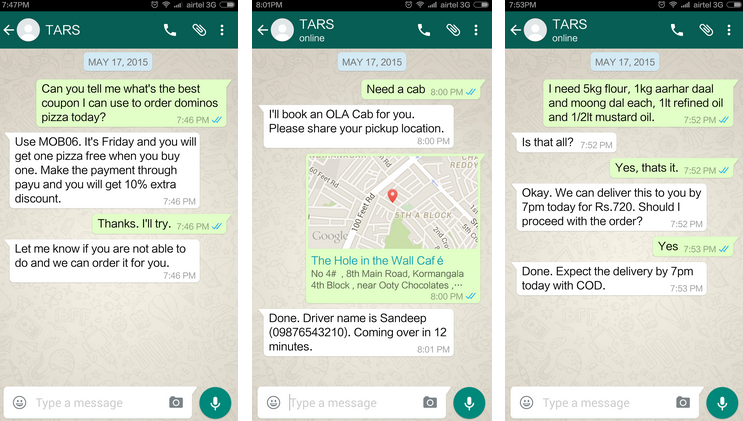
Co-founded by Vinit Agarwal and Ish Jindal, Tars is an on demand service which uses Whatsapp to take users’ requests like Google search, making phone calls and reservations, read through reviews, compare prices, order a Pizza, call for a Plumber, Meaning of any word, etc. TARS, a startup based out of Bangalore, India has created a Whatsapp based personal assistant that will answer all your questions, as long as they are within it’s purview. It is a sort of artificial intelligence program which is partially based on the local agents to work. TARS personal assistant is available to you from 10 AM to 10 PM.

If you are curious of the name TARS – it is the name of a robot in hit Hollywood movie “Interstellar” who helps astronauts in their inter-galactic travels. The website claims, Tars is partially an artificial intelligence that operates with aids from local experts.

WhatsApp has 70 million users in India. There seems to be a big opportunity of business for TARS in near future. Before this, Hike Messenger had also introduced a personal assistant in their app through which user could gather a lot of information about movies, Wikipedia, dictionary, Jokes and a lot of other entertainment things. But TARS is has real humans answering your questions and hence gives much useful results.

How Do You Use Tars?

The process is extremely user-friendly and time saving. All you have to do is, save 9900876785 to your contact and just send a ‘Hello TARS’ message through Whatsapp. Put forth your query and receive the response accordingly, quickly.

It will ask you the relevant information like your mail or address the first time it needs to serve you. After that, TARS knows and remembers who you are. The services are offered throughout the week from 10 AM to 10 PM.
tars-1

Are its Services Chargeable?

Payment will depend on the kind of service demanded. For query like – “Which are the best dining places in any specific area? Tars would furnish a list of best known restaurants in that locality. Also, it would offer its own suggestions, based on its expertise. Chat services like this, are totally free.

If you want to book a train ticket or order for a product, the service would be chargeable. Tars will take care of the entire process except the transaction. For payment, it will send you a secured payment link powered by Instamojo where you can fill up the details. The booking would be made on your behalf. There won’t be any booking charges or additional/hidden charges, rather it adds relevant coupons too, if applicable.

Currently TARS’s database is updated with Bangalore city only but you can still use it if you live in different city. Agents of TARS use Google search to get the best results for you. It has only been a month that its services have been rolled out. Given the fact that it is a newbie in the market, its back-end services are still at their workshop stage.

As of now the service is free of cost but, in future there is a strong possibility that the service will be paid. If they keep it free, they may charge commissions on orders placed through TARS. We will see…
Visit Tars Here

Schedule an email to be sent later

Hello Tech stuffs users,

Everyone in the world are so busy on their works. In the mean time you want to enjoy your life too. But sometime due to some problems we may fail in some thing. one of the most thing is with a job. Especially we fail to mail the details at correct time.

To overcome this we have a solution for you. Now you can schedule the mail on gmail to be sent at any time even if your computer is off..
Boomerang for Gmail lets you take control of when you send and receive email messages.

A new innovation which will be more useful for everyone. You can schedule your email to be sent at any time by this small extension. Its now for firefox, chrome and saafari. It works on gmail and google apps mail.

Have fun....