Hello users!!
Its been a long time after my last post.. but today I am here with a great post which will be more interesting for you.
Ya you heard it correct. earn unlimited flipkart vouchers.. A new website is offering free flipkart vouchers of 50 rs.
STEP !: Click here to go to the website
STEP 2: Just fill in your details and submit your application.
STEP 3: Validate your id by email sent to you.
STEP 4: connect your fb with that
After 24 hours you will get rs 50 flipkart money. The details regarding that will be mailed to you from the website
Enjoy :-)

Report Suicidal posts on facebook to help others
Love to share
A few ago, in order make its product more helpful, Facebook updated its tool to report suicidal posts. Facebook claims that this tool will make it easy to report a person if he is having any kind of suicidal tendency. You can report a friend’s suicidal post and that friend will be provided help using different measures.
Today, I am going to tell you how to report suicidal posts on Facebook.
Step 1:Click on the arrow in top right corner of the post and then click on “I don’t like this post.”

Step 2: Now click on “I think it shouldn’t be on Facebook” and continue.
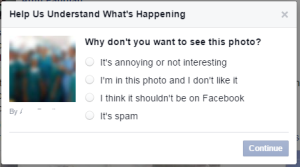
Step 3: Select “It’s hurtful, threatening or suicidal” and continue.
Step 4:Now select “I think they might hurt themselves.”
Step 5: Now Facebook will give you different options to reach to your friend who is having some suicidal tendency. This option may vary in number depending upon the services provided in your region.
By using this feature you can also block users account .. have fun.
Visit us for more :-)
A few ago, in order make its product more helpful, Facebook updated its tool to report suicidal posts. Facebook claims that this tool will make it easy to report a person if he is having any kind of suicidal tendency. You can report a friend’s suicidal post and that friend will be provided help using different measures.
Today, I am going to tell you how to report suicidal posts on Facebook.
Step 1:Click on the arrow in top right corner of the post and then click on “I don’t like this post.”
Step 2: Now click on “I think it shouldn’t be on Facebook” and continue.

Step 3: Select “It’s hurtful, threatening or suicidal” and continue.
Step 4:Now select “I think they might hurt themselves.”
Step 5: Now Facebook will give you different options to reach to your friend who is having some suicidal tendency. This option may vary in number depending upon the services provided in your region.
By using this feature you can also block users account .. have fun.
Visit us for more :-)
Free Coupons!!!
Love to Share
Hello Techstuffs Users,
Free coupons on all e-purchasing!!!
Ya!! You heared it correct. We are going to show you a best way for getting coupons on best e-shopping sites such as Flipkart, Ebay, Jabong, Myntra, SnapDeal, Shopclues, Infibeam, Indiatimes Shopping, Yebhi, Tradus, HomeShop18, MakemyTrip, Yatra, ClearTrip, Redbus, Goibibo, Dominos and Foodpanda...
Lets get in to it..
Requirements: A laptop or computer :-)
Hello Techstuffs Users,
Free coupons on all e-purchasing!!!
Ya!! You heared it correct. We are going to show you a best way for getting coupons on best e-shopping sites such as Flipkart, Ebay, Jabong, Myntra, SnapDeal, Shopclues, Infibeam, Indiatimes Shopping, Yebhi, Tradus, HomeShop18, MakemyTrip, Yatra, ClearTrip, Redbus, Goibibo, Dominos and Foodpanda...
Lets get in to it..
Requirements: A laptop or computer :-)
Facebook new update - Sell something Button!!
Hello tech Stuff Users,
Facebook is now working on a new feature that could make (Sell Something Button In Groups) buying/selling of goods/services on the website way easier. A new report by The Next Web suggests that Facebook is currently testing a new ‘Sell Something’ button that will essentially allow users to sell stuff while posting something to a group.
Users will see a ‘Sell Something’ button next to ‘Write Post’ when they try to post in Facebook groups. When users click on ‘Sell Something’, they will be able to add basic information about the product including the description, price, pictures and delivery options.
Facebook said in a press release that this is a test:
We are testing a new feature within Facebook Groups to help people better organize posts about items they’d like to sell to other people on Facebook. This is a small test limited to select Facebook Groups that have active selling communities today.
Once you share the information, buyers will be able to send offers and discuss the sale via the comment box seen beneath all Facebook posts. The social networking site doesn’t do anything further to facilitate the deal, just formats the post nicely with clear prices and pricing details.
A Facebook help page suggests that in case of disputes, the buyer should contact the seller and that Facebook is not responsible for any transactions made through the social networking website.
Facebook also has a Help Center entry about selling things via groups:
Is Facebook responsible for things sold in a Group?
No, both buyers and sellers are responsible for things sold in a Facebook Group.
Buyers: Any transaction made through a Facebook Group is between you and the seller. Keep in mind Facebook doesn’t own or possess any items a seller lists, so if you have any questions about the things you’re buying in a Facebook Group, try contacting the seller.
Sellers: Please describe the items you’re selling clearly and make sure you’re following both our Statement of Rights and Responsibilities and Community Standards.

Note: This feature is only available in some countries right now.
Facebook had launched the Groups app for Android and iOS last month. The Groups feature lets users create and interact with communities on the site, whether they’re based on hobbies, geography or culture.
Previously, Facebook had introduced ‘Gifts’ on the site which allowed users to send their friends based in US certain actual gifts, but that wasn’t a big success. Now, they are hoping users will take to selling/buying goods on the site, via this new button, although this is still in beta mode.
Facebook is now working on a new feature that could make (Sell Something Button In Groups) buying/selling of goods/services on the website way easier. A new report by The Next Web suggests that Facebook is currently testing a new ‘Sell Something’ button that will essentially allow users to sell stuff while posting something to a group.
Users will see a ‘Sell Something’ button next to ‘Write Post’ when they try to post in Facebook groups. When users click on ‘Sell Something’, they will be able to add basic information about the product including the description, price, pictures and delivery options.
Facebook said in a press release that this is a test:
We are testing a new feature within Facebook Groups to help people better organize posts about items they’d like to sell to other people on Facebook. This is a small test limited to select Facebook Groups that have active selling communities today.
Once you share the information, buyers will be able to send offers and discuss the sale via the comment box seen beneath all Facebook posts. The social networking site doesn’t do anything further to facilitate the deal, just formats the post nicely with clear prices and pricing details.
A Facebook help page suggests that in case of disputes, the buyer should contact the seller and that Facebook is not responsible for any transactions made through the social networking website.
Facebook also has a Help Center entry about selling things via groups:
Is Facebook responsible for things sold in a Group?
No, both buyers and sellers are responsible for things sold in a Facebook Group.
Buyers: Any transaction made through a Facebook Group is between you and the seller. Keep in mind Facebook doesn’t own or possess any items a seller lists, so if you have any questions about the things you’re buying in a Facebook Group, try contacting the seller.
Sellers: Please describe the items you’re selling clearly and make sure you’re following both our Statement of Rights and Responsibilities and Community Standards.
Note: This feature is only available in some countries right now.
Facebook had launched the Groups app for Android and iOS last month. The Groups feature lets users create and interact with communities on the site, whether they’re based on hobbies, geography or culture.
Previously, Facebook had introduced ‘Gifts’ on the site which allowed users to send their friends based in US certain actual gifts, but that wasn’t a big success. Now, they are hoping users will take to selling/buying goods on the site, via this new button, although this is still in beta mode.
Be active 24hrs in FB without Internet
Hello Tech stuffs readers,
Facebook is a trending social media between the youth's nowadays. We spend more time on facebook every day. Sometimes it gets bored but still we love to be online.
We all came to know that facebook has updated its privacy policy. But there are something new we left unidentified with that.
The thing I noticed yesterday. Those who use "facebook for every mobile" app for logins and in any app if you login your facebook it shows online. Before if you turn your chat off then you wont be seen on chat list.
But now If you even turn off your chat you are shown online on this mobile app (Not in messenger).
At the same time if you close your browser without logging out it wont shows active, for users. But now if you shut your browsers or switch off your internet connection without logging out you are shown as active. You may search the name and find it.
Enjoy this. So just switch off your internet without logging out from your browser and be active for all days
Happy reading .........
Facebook is a trending social media between the youth's nowadays. We spend more time on facebook every day. Sometimes it gets bored but still we love to be online.
We all came to know that facebook has updated its privacy policy. But there are something new we left unidentified with that.
The thing I noticed yesterday. Those who use "facebook for every mobile" app for logins and in any app if you login your facebook it shows online. Before if you turn your chat off then you wont be seen on chat list.
But now If you even turn off your chat you are shown online on this mobile app (Not in messenger).
At the same time if you close your browser without logging out it wont shows active, for users. But now if you shut your browsers or switch off your internet connection without logging out you are shown as active. You may search the name and find it.
Enjoy this. So just switch off your internet without logging out from your browser and be active for all days
Happy reading .........
Your computer VIRUS affected ??
To Know whether your computer is affected from Viruses Or Not
Here Are the signs To know whether your PC is Having Infected the virus attacked
1) Hold Windows Logo Key and Press R key if the Run Option is missing then your PC is infected from Sality virus
2) Go to "My Computer" and Click The Tool from Menu and If Folder Option is missing then your PC is Infected from Autorun.inf Virus
3) Go to Start Menu and Type Cmd and Open If its does not access means Your PC is infected from Hidden Rootkit
4) Go to C:/ and The Font of Windows and Program is BOLD Then your PC attacked by Trojan Horse
5) Go to My Computer and Double click on any Drive example D:
If the Drive is opens in new window then your PC is Infected from win32 virus
6) If in Case your desktop Icon is invisible After 2 to 3 minutes then your System is infected from Desktop.exe Virus
7) Go to My Computer and go to D; or E; Volume Drive and if there were Two folders of same Name/Size/Files and Data ..its Means your Pc is Infected from .EXE viruses
Here Are the signs To know whether your PC is Having Infected the virus attacked
1) Hold Windows Logo Key and Press R key if the Run Option is missing then your PC is infected from Sality virus
2) Go to "My Computer" and Click The Tool from Menu and If Folder Option is missing then your PC is Infected from Autorun.inf Virus
3) Go to Start Menu and Type Cmd and Open If its does not access means Your PC is infected from Hidden Rootkit
4) Go to C:/ and The Font of Windows and Program is BOLD Then your PC attacked by Trojan Horse
5) Go to My Computer and Double click on any Drive example D:
If the Drive is opens in new window then your PC is Infected from win32 virus
6) If in Case your desktop Icon is invisible After 2 to 3 minutes then your System is infected from Desktop.exe Virus
7) Go to My Computer and go to D; or E; Volume Drive and if there were Two folders of same Name/Size/Files and Data ..its Means your Pc is Infected from .EXE viruses
Free UNLIMITED talktime!!!
These days the telecom providers charge more amount for calls and internet packages. And our usage too getting high.. To overcome the recharge problems there are many solutions. There are many app which is providing free talktime for some activities..
Today we are going to see one of the best app in that category.
mcent
Its a old app launched before two years. Those times offers was good but then they reduced that. Mcent is a app which allows you to download other apps by providing you free talktime. They pay minimum 4 rs to 15 rs for downloading each app from their application.
Before few months there was only limited apps to download. So it became unpopular. But now mcent has introduced many unique links for more offers. By using these offers we can earn unlimited talktime.
Lets get in to it. You just need a android mobile for this :-)
First download mcent from this link : http://goo.gl/jKKLlM
Enter your mobile number, choose a password and sing in..
There will be three columns. Go to new offers ....
You will find many apps. just click and download them. That's it you will be paid for each app you download. Now mcent has many new offers with high cashout. Start bragging..
Thats it ..Enjoy earning...
Today we are going to see one of the best app in that category.
mcent
Its a old app launched before two years. Those times offers was good but then they reduced that. Mcent is a app which allows you to download other apps by providing you free talktime. They pay minimum 4 rs to 15 rs for downloading each app from their application.
Before few months there was only limited apps to download. So it became unpopular. But now mcent has introduced many unique links for more offers. By using these offers we can earn unlimited talktime.
Lets get in to it. You just need a android mobile for this :-)
First download mcent from this link : http://goo.gl/jKKLlM
Enter your mobile number, choose a password and sing in..
There will be three columns. Go to new offers ....
You will find many apps. just click and download them. That's it you will be paid for each app you download. Now mcent has many new offers with high cashout. Start bragging..
Thats it ..Enjoy earning...
Let's Call Free.....
Hello Tech Stuff users!!
Here is a amazing app for you to make unlimited call over India. By this app you can call any person in India without spending a single paisa... :)
Requirements: All you require is an android mobile.....
lets make through.... Visit us for more updates...
Flipcall: Low-cost Calls is a new android app introduced. You can use this to call anybody around the world.
How to use Flipcall
$tep 1: First download flipcall from googleplay https://play.google.com/store/apps/details?id=com.flipcall&hl=en
$tep 2: Enter your details and register on it.
$tep 3: This app gives you singup bonus of 1$(61 rs). Each call costs 0.53 paise only.
You can call till this balance gets off.
How to Get Unlimited call from Flipcall
After your balance goes to 0 rs Do the following steps:
go to Settings in your mobile > App manager > Flipcall > Then clear the data .....
Now again singup by providing your number and enjoy another 1$ (60 minutes) :)
Also find recharge offers here http://allstuffsforyou.wordpress.com/2014/10/21/get-50rs-free-recharge/
Stay connected. Happy reading :)
Here is a amazing app for you to make unlimited call over India. By this app you can call any person in India without spending a single paisa... :)
Requirements: All you require is an android mobile.....
lets make through.... Visit us for more updates...
Flipcall: Low-cost Calls is a new android app introduced. You can use this to call anybody around the world.
How to use Flipcall
$tep 1: First download flipcall from googleplay https://play.google.com/store/apps/details?id=com.flipcall&hl=en
$tep 2: Enter your details and register on it.
$tep 3: This app gives you singup bonus of 1$(61 rs). Each call costs 0.53 paise only.
You can call till this balance gets off.
How to Get Unlimited call from Flipcall
After your balance goes to 0 rs Do the following steps:
go to Settings in your mobile > App manager > Flipcall > Then clear the data .....
Now again singup by providing your number and enjoy another 1$ (60 minutes) :)
Also find recharge offers here http://allstuffsforyou.wordpress.com/2014/10/21/get-50rs-free-recharge/
Stay connected. Happy reading :)
Subscribe to:
Posts
(
Atom
)